이제 MVP 기능을 마무리하고, 각자 리팩토링 까지완료해서 프로젝트의 성능과 고도화 기능에 대해서 고민해보았고, 이제 오늘부터 이제 기술 고도화 작업에 들어갓다. 확실히 난이도 있는 작업 이라서 많이 어려웠다.
🚀 웹 크롤링
웹 크롤링은 인터넷 상의 웹사이트를 정보를 자동으로 수집하는 기술 이다.
1️⃣ Selenium : 브라우저 자동화 기반 동적 크롤링 도구
이중에서 가장 보편적으로 쓰고 있는게 파이썬의 라이브러리인 Selenium 을 사용해보았다.
Selenium은 웹 브라우저를 실제로 띄우고 조작할 수 있는 자동화 도구 이다.
JavaScript로 렌더링된 데이터도 눈에 보이듯 수집할수 있다. ❗ ( 정적 데이터 에서도 해도 크게 문제는 없다. 오히려 확장성 👍 )
실제 브라우저를 띄우고 조작 가능하고, 버튼 클릭, 로그인, 스크롤등이 가능하다.
하지만 속도가 느리고 메모리 사용량이 많다.
2️⃣ BeautifulSoup : 정적 크롤링 도구
이외도 다른 라이브러리가 있다. Selenium과 다르게 BeautifulSoup 가 있다.
가볍고 빠르며, 페이지 수백 개도 빠르게 처리하고, 초보자 친화적이라 익숙한 코드 구조로 쉽게 배울수 있다.
하지만 동적 콘텐츠와 사용자 인터랙션 미지원이라는 제한이 라는 단점이 있다.
📕 웹 크롤링 적용
처음에는 라이브러리가 적용되어 있지않아서 터미널에 라이브러리를 설치 해주었다.
파이썬에는 다양한 라이브러리가 존재하고 있다는 것이 다른 언어에 비해 가장 큰 장점이 있는것 같다.
pip install selenium허가를 받은 사이트 dovelet 코딩 테스트 사이트에서 문제 데이터를 가져오는 용도로 웹 크롤링을 사용하였다.
http://59.23.132.191/30stair/
from selenium import webdriver
from selenium.webdriver.common.by import By
from selenium.webdriver.chrome.options import Options
import json
import time

# 셀레니움 설정
options = Options()
options.add_argument('--headless')
driver = webdriver.Chrome(options=options)

# 공통 구조에서 <h4> 이후 설명 추출 함수
def extract_section_text(driver, header_text):
    return driver.execute_script(f"""
        const h4s = Array.from(document.querySelectorAll('h4'));
        const header = h4s.find(h => h.textContent.trim() === "{header_text}");
        if (!header) return '';

        const result = [];
        let el = header.nextSibling;

        while (el) {{
            if (el.nodeType === Node.ELEMENT_NODE && el.tagName.toLowerCase() === 'h4') break;
            if (el.nodeType === Node.TEXT_NODE && el.textContent.trim()) {{
                result.push(el.textContent.trim());
            }} else if (el.nodeType === Node.ELEMENT_NODE && el.innerText.trim()) {{
                result.push(el.innerText.trim());
            }}
            el = el.nextSibling;
        }}

        return result.join('\\n').trim();
    """)

base_url = "http://59.23.132.191/30stair/"
results = []

driver.get(base_url)
tables = driver.find_elements(By.XPATH, '/html/body/table')
problem_id = 1

for table_index, table in enumerate(tables, start=1):
    rows = table.find_elements(By.TAG_NAME, 'tr')

    # 실제 문제 데이터는 보통 tr[2]부터 시작 (헤더 제외)
    for row_index in range(1, len(rows)):
        try:
            # 동적으로 table과 row 인덱스 조합
            xpath = f'/html/body/table[{table_index}]/tbody/tr[{row_index+1}]/td[2]/a'
            link = driver.find_element(By.XPATH, xpath)
            link.click()
            time.sleep(0.002)

            # 문제 상세 수집
            title = driver.find_element(By.XPATH, '/html/body/div[1]').text.strip().replace("프로그램 명: ", "")
            time_limit = driver.find_element(By.XPATH, '/html/body/div[2]').text.strip().replace("제한시간: ", "")
            try:
                description = driver.find_element(By.XPATH, '//*[comment()[contains(., "here")]]/following-sibling::*[1]').text.strip()
            except:
                description = driver.find_element(By.XPATH, '/html/body/p').text.strip()

            input_description = extract_section_text(driver, "입력")
            output_description = extract_section_text(driver, "출력")

            try:
                sample = driver.find_element(By.XPATH, '/html/body/pre').text.strip()
            except:
                try:
                    sample = driver.find_element(By.CLASS_NAME, 'io').text.strip()
                except:
                    sample = ""

            results.append({
                "id": problem_id,
                "title": title,
                "time_limit": time_limit,
                "description": description,
                "input": input_description,
                "output": output_description,
                "sample": sample
            })
            print(f"[{problem_id}] {title} ✅")

        except Exception as e:
            results.append({
                "id": problem_id,
                "error": str(e)
            })
            print(f"[{problem_id}] 오류: {e}")

        finally:
            problem_id += 1
            driver.back()
            time.sleep(0.002)

driver.quit()

# JSON 저장
with open("problems.json", "w", encoding="utf-8") as f:
    json.dump(results, f, indent=2, ensure_ascii=False)
(부연설명 추가예정)
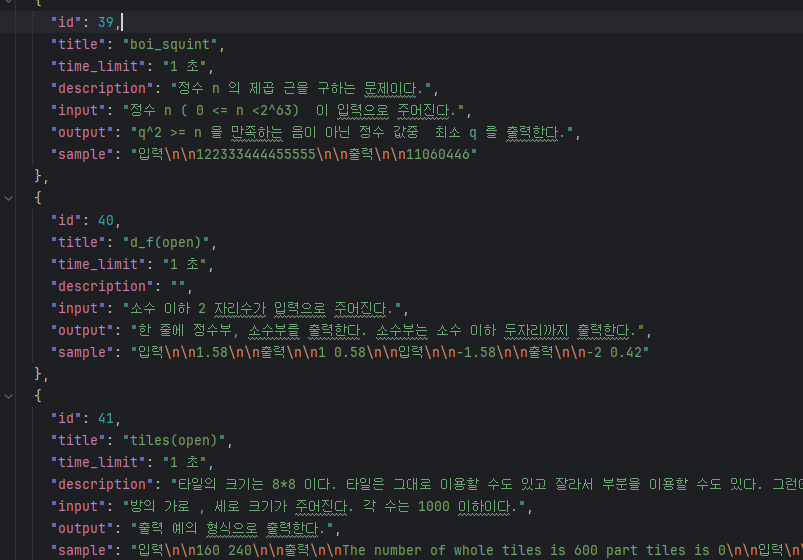
한 문제 하나의 JSON 형식으로 나타내었다. 우리 프로젝트에서 필요한 형식과 잘 맞게 하기 위해서, 보완해야할 점이 있다.
- 메모리 제한 필드가 없다.
- 입출력 예시
- 테스트케이스 입력값과 출력값과 분리해서 가져올 필요가 있다.
- 문제 이미지 유무 ( 예외처리 적용 )
'[내일배움캠프-Sparta] > Spring 6기' 카테고리의 다른 글
| TIL 79 - [ Spring 최종 프로젝트 ( Day 15 ) - 문제 파트 의사결정 ] (0) | 2025.06.18 |
|---|---|
| TIL 78 - [ Spring 최종 프로젝트 ( Day 14 ) - 웹 크롤링 (2) ] (0) | 2025.06.17 |
| TIL 76 - [ Spring 최종 프로젝트 ( Day 12 ) - 코드 리팩토링(2) 동적쿼리 QueryDSL, 트러블 슈팅 ] (0) | 2025.06.13 |
| TIL 75 - [ Spring 최종 프로젝트 ( Day 11 ) - 코드 리팩토링(1) 동적쿼리 QueryDSL ] (0) | 2025.06.12 |
| TIL 74 - [ Spring 최종 프로젝트 ( Day 10 ) - 코드 리뷰(피드백), 추후 계획, Swagger ] (0) | 2025.06.11 |